
 AI VIDEO DUBBING THAT RUNS ON YOUR PC
Dub your videos into 40 languages.
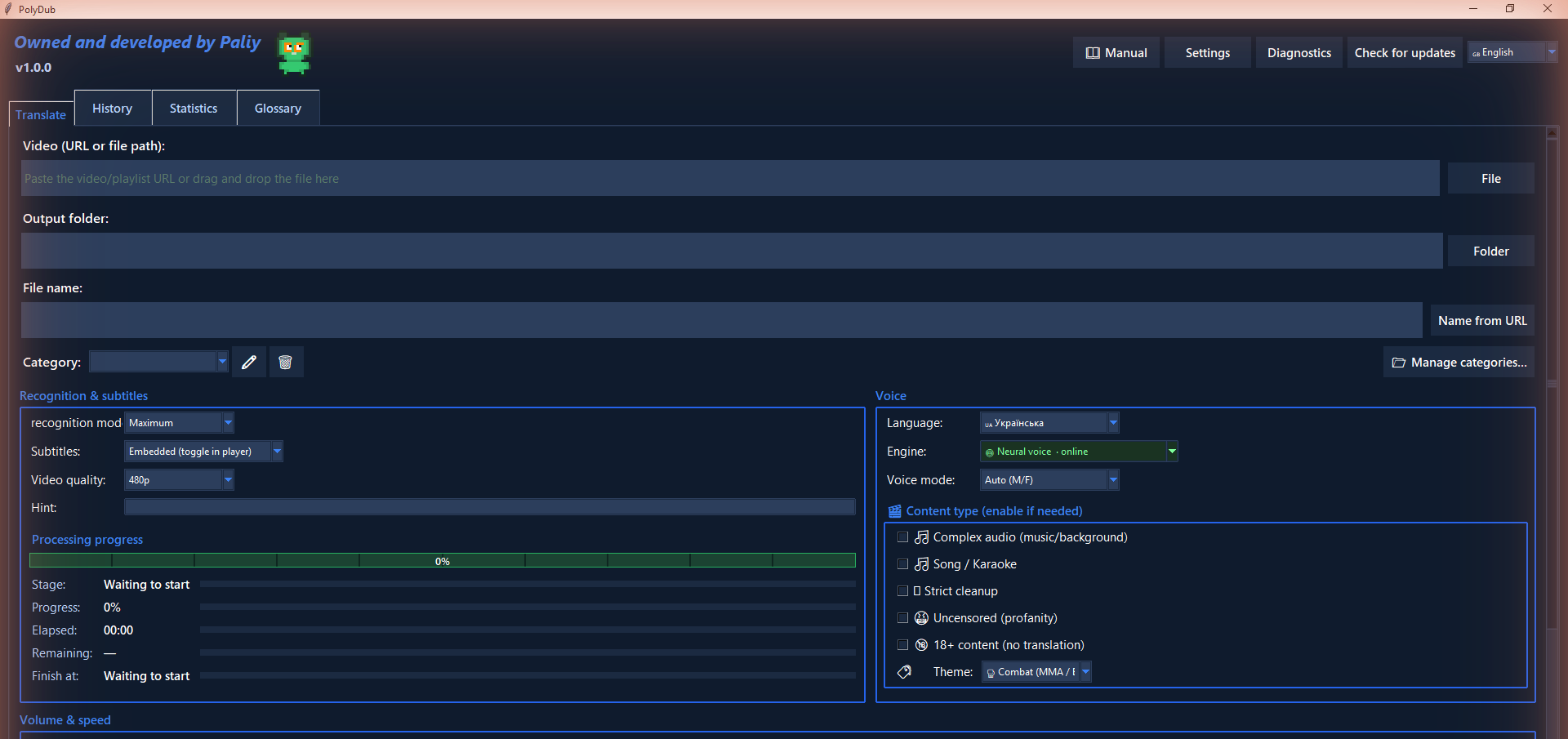
Drop in your video — PaliyTech Dubbing recognizes the speech, translates it and adds a natural voice-over and subtitles. Everything is processed on your own PC: nothing to upload, no minute limits, pay once.
Launch price $29 (regular $39)Lifetime license · up to 3 PCs · Windows 10/11
 WHY PALIYTECH DUBBING
Made to just work.
Local & private
Your video files never leave your computer — recognition and translation run on your PC. Only the translated text goes to the online voice, or pick an offline voice and work with no internet.

- Videos are never uploaded
- Recognition & translation on your PC
- Online voice gets text only
- Fully offline mode available
Pay once
One lifetime license covering up to 3 PCs. No monthly fees and no minute caps like cloud tools — buy it once and use it as much as you want.

- One-time payment
- License for up to 3 PCs
- No minute limits
- No monthly fees, ever
Natural voice-over
A real-sounding voice reads the translation while the original ducks smoothly underneath — clear speech, with the music and mood kept intact.

- Male & female voices
- Smart audio ducking
- Music & mood preserved
- Auto voice match to the speaker
Batch up to 999
Line up hundreds of videos in the queue — each with its own language and voice — then let it run unattended while you get on with everything else.

- Up to 999 in the queue
- Own language & voice per video
- Runs unattended
- The queue survives a reboot
HOW IT WORKSFrom your video to a finished dub in three steps.


 FEATURES
Everything you need, in one app.
Your video in another language, in one click
Drop in your video file — PaliyTech Dubbing recognizes the speech, translates it and dubs it, with no manual steps. A video can also be imported by link: only content you own or are allowed to use (EULA §3–4).
- Drag and drop your video file
- Automatic source-language detection
- A finished MP4 with the translated track
 LANGUAGES
Dubs between 40 languages.
Automatic source-language detection and translation between 40 languages — in any direction. 23 of them also have an offline voice.
 English
 Русский
 Español
 中文
中文 日本語
日本語 Deutsch
 Français
 Italiano
 Português
 Polski
 Українська
 한국어
한국어 العربية
 हिन्दी
 Türkçe
 Nederlands
 Svenska
 Norsk
Norsk Dansk
Dansk Suomi
Suomi Čeština
 Ελληνικά
 Magyar
 Română
 Български
 Slovenčina
 Hrvatski
 Српски
 Slovenščina
 Català
 Bahasa Indonesia
 Tiếng Việt
 עברית
עברית Lietuvių
 Latviešu
 Eesti
Eesti Македонски
 Bosanski
 Galego
 Bahasa MelayuUSE CASES
Built for whatever you watch.
One app, every kind of video — from a quick Short to a full season.
PRIVACY FIRSTYour videos never leave your PC.
Video files are processed on your own computer. Only text ever goes online — and only when you use the online voice or an online translator.
Videos are never uploaded
Speech recognition and the built-in translator run on your machine. Your footage never goes to anyone's servers — ours included.
Only text goes online
The default online voice (Microsoft) receives just the translated text it reads aloud. Optional online translators — Gemini, Groq, DeepL with your own key — receive the text to translate.
Can run fully offline
Download everything in advance (Settings → Offline packs), pick an offline voice — and dub local files with no internet at all.
No telemetry, no account
No sign-up, no tracking. Activation is checked on your PC; settings, history and cache stay in your local folder.
NUMBERSBig limits, one price.
Lots of languages, huge batches, and a one-time price. Everything a cloud tool rations out — here with no meter running.

Languages, any direction
Languages with an offline voice
Videos in one queue
Pay once, no subscription
WHAT SETS IT APARTMore than just translation.
The little things that turn a rough auto-dub into something you'd actually want to watch.
Old & personal videos
Bring home videos and archival clips back to life — translate and voice them over, even when the original sound is rough or missing.
Music & emotion preserved
Smart ducking dips the original only under the voice — music, tone, and atmosphere stay intact.
Translation you can tune
Hints stop the recognizer inventing names, a glossary locks your terms, and post-processing tidies the rest.
Modes for any content
Presets for songs and karaoke and for speech with strong language, plus 20+ topic term sets — from woodworking to MMA.
Female & male voices
A female and a male voice, with automatic gender matching to the original speaker.
Old & personal videos
Bring home videos and archival clips back to life — translate and voice them over, even when the original sound is rough or missing.
Music & emotion preserved
Smart ducking dips the original only under the voice — music, tone, and atmosphere stay intact.
Translation you can tune
Hints stop the recognizer inventing names, a glossary locks your terms, and post-processing tidies the rest.
Modes for any content
Presets for songs and karaoke and for speech with strong language, plus 20+ topic term sets — from woodworking to MMA.
Female & male voices
A female and a male voice, with automatic gender matching to the original speaker.
Stays in sync
Each translated line is time-fitted to the original, so the voice tracks the timing without drifting.
History & one-click repeat
Open, preview, or re-run any finished job from History with the same settings.
Telegram notifications
Optional: get a ping in your own Telegram bot when a long job or the whole queue finishes.
No telemetry, no account
No sign-up and no usage tracking. Settings, history, and cache stay in your local profile folder.
Queue survives restarts
The queue is saved to disk, so a reboot or a Windows update won't lose your pending jobs.
Stays in sync
Each translated line is time-fitted to the original, so the voice tracks the timing without drifting.
History & one-click repeat
Open, preview, or re-run any finished job from History with the same settings.
Telegram notifications
Optional: get a ping in your own Telegram bot when a long job or the whole queue finishes.
No telemetry, no account
No sign-up and no usage tracking. Settings, history, and cache stay in your local profile folder.
Queue survives restarts
The queue is saved to disk, so a reboot or a Windows update won't lose your pending jobs.
COMPAREPaliyTech Dubbing vs cloud services.
Same job — translate and dub video — minus the subscriptions, the limits, and uploading your files to a stranger's cloud.
REQUIREMENTSWhat you'll need to run it.
On first use the app downloads its AI models: ~1.5 GB for speech recognition and ~2.8 GB for the translator (every pair except English → Russian/Ukrainian). Want to work with no internet? Download everything in advance in Settings → Offline packs and pick an offline voice. NVIDIA acceleration turns on by itself.
PRICINGOne price. Yours for good.
No subscription and no minute limits — pay once and dub as much as you like.
Right now the purchase goes through our Telegram bot and is paid in Telegram Stars. Card and PayPal checkout on this website is coming soon.
- One-time payment — no subscription
- Up to 3 computers
- All 40 languages, no minute limits
- Your videos are processed on your PC
- Support by e-mail and Telegram
Before you buy, check the system requirements. Sales are final once your key is issued; if the app doesn't work on your PC and we can't fix it, we refund you — see the Refund policy.
Already bought? Activate your licenseFAQFrequently asked questions.

Today, through our Telegram bot @PolyDubbing_bot: pay in the bot (Telegram Stars), send it the Machine ID from the app's activation window, and your license key arrives right away. Card and PayPal checkout on this website is coming soon. One purchase covers up to 3 PCs, for life — handy if you switch computers (reinstalling on the same PC is unlimited).
Windows 10/11 64-bit; a macOS version is coming soon. 8 GB of RAM is enough — tested on a dual-core Pentium without an NVIDIA card. Disk space: ~6 GB for English → Russian/Ukrainian, ~9 GB for other pairs, up to ~12 GB with Maximum recognition. An NVIDIA (CUDA) card makes recognition and translation several times faster — it turns on automatically. Please check these before you buy.
Sales are final once your license key is issued: at checkout you agree to immediate delivery and give up the 14-day right of withdrawal (EU/EEA/UK). That's why we ask you to check the system requirements and ask us anything before buying. If the app doesn't work on your computer and we can't fix it, we refund you. Details: Refund policy.
Message our Telegram bot @PolyDubbing_bot — /support answers common questions right away. Include your purchase code or Machine ID and, for technical issues, what Diagnostics (a button in the app's top bar) shows. Questions about a payment, receipt or refund — the support of the store that processed your payment (its contact is in your receipt e-mail).
PaliyTech Dubbing is developed and sold by {SELLER_LEGAL_NAME}, Ukraine. Card and PayPal orders on this website are processed by our authorized reseller, the merchant of record, which handles payment, taxes and invoices. See Terms of Use.
Once, on first use, to download the AI models (~1.5 GB for speech recognition plus ~2.8 GB for the translator on most language pairs). After that, only for the online voice, an online translator or importing a video by link. To work with no internet at all, download everything in advance in Settings → Offline packs and choose an offline voice (23 languages) — then local files are dubbed with no connection.
Never your video files — they are processed on your PC. The default online voice (Microsoft's neural voices) receives only the translated text it reads aloud; optional online translators (Gemini, Groq, DeepL — with your own key) receive the text to translate. The app also downloads its models and updates. No telemetry, no account. Details are in our Privacy Policy.
English, Spanish, German, French, Italian, Portuguese, Polish, Ukrainian, Russian, Chinese, Japanese, Arabic and more — 40 languages, in any direction. 23 of them also have an offline voice. Quality is best when translating from English; from Arabic, Hebrew or Hindi, review the translation before publishing.
It's machine translation and voice synthesis — excellent for watching, studying, and drafts. For commercial publishing, a manual proof is recommended. There is no lip-sync.
Yes. Starting with version 1.0.3, every finished video carries a machine-readable label saying the voice-over is AI-generated, as the EU AI Act requires. How to check it: AI label.

 GET PALIYTECH DUBBING
Ready to dub your first video?
Lifetime license for up to 3 PCs. Buy and activate in a couple of minutes.